
Lead CRM
A lead CRM built for coworking sales.
Every tour request, walk-in and website enquiry lands in one pipeline. Your team knows who to call next, sends a proposal in a few minutes, and turns a won lead into a member without typing anything twice.
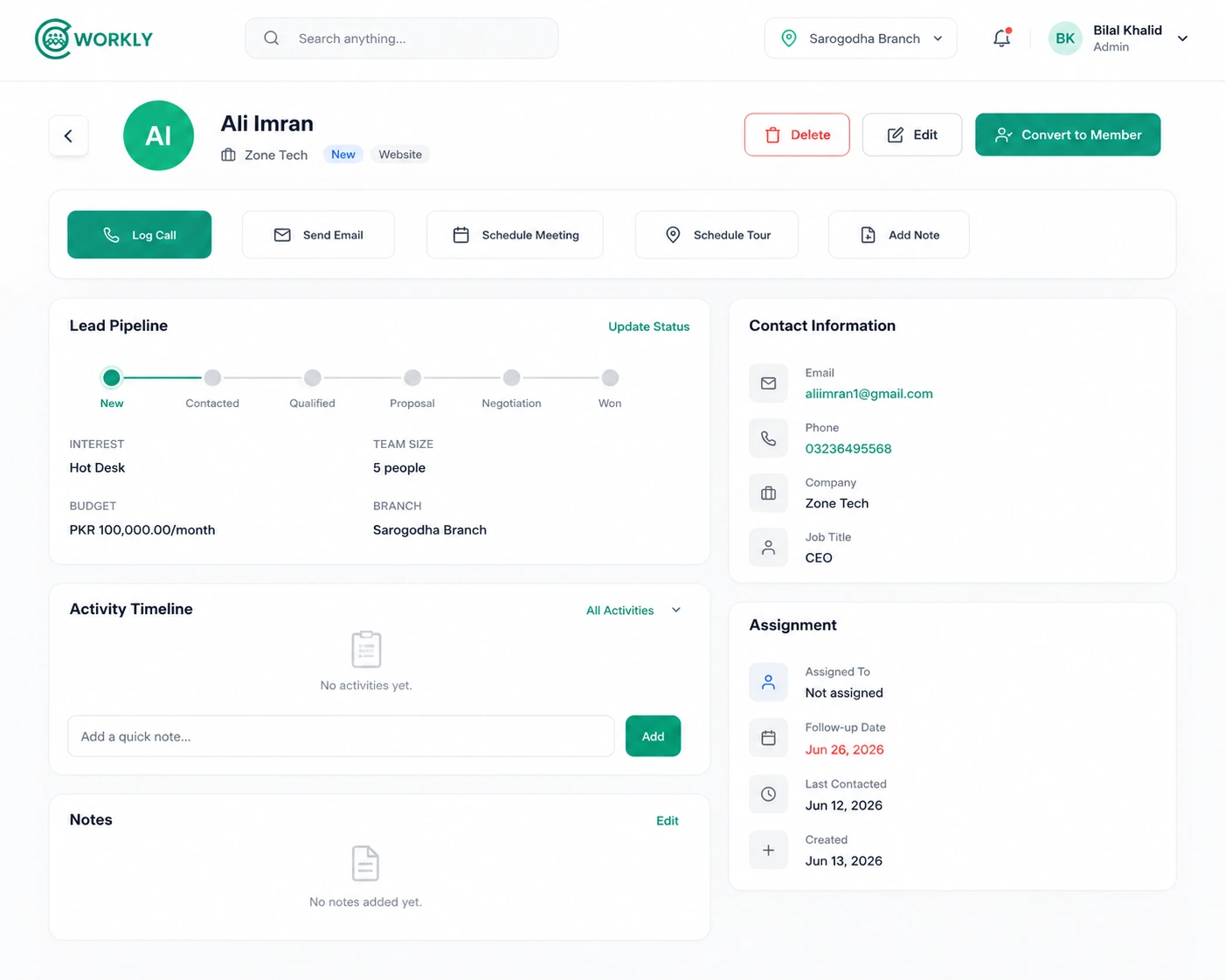
Watch the lead CRM in action.
A short walkthrough of capturing a lead, moving it through the pipeline and sending a proposal.

How a lead moves through CoWorkly.
Four steps, from the first enquiry to a paying member. Each one is recorded on the lead, so anyone on your team can pick it up.
-
Capture the enquiry
Add leads by hand, or let your website's enquiry form send them straight into CoWorkly. Each lead keeps its source, such as website, referral, walk-in, social media or an event, so you can see which channels bring in members.
-
Assign and follow up
Give the lead to a team member and set a follow-up date. CoWorkly reminds them when it is due, and the dashboard lists every lead that needs a call today.
-
Send a proposal
Build a proposal from your plans and prices, then email it as a branded PDF. The lead moves to the Proposal stage and the proposal is logged on its timeline.
-
Convert to a member
When the deal is won, convert the lead to an individual or company member in one click. Their details carry over, ready for a plan, a desk and the first invoice.
A sales pipeline with clear stages.
Every lead sits in one stage, and every stage change is written to the lead's timeline with the date and the person who made it.
-
New
The enquiry has arrived and nobody has spoken to them yet.
-
Contacted
You have called, emailed or met them for a tour.
-
Qualified
They have a real need, a budget and a start date.
-
Proposal
A proposal with pricing has been sent.
-
Negotiation
You are agreeing the final terms.
-
Won
They said yes. Convert them to a member.
Leads that do not work out are marked Lost or Unqualified, so they stay on record without cluttering the active pipeline.
Proposals your leads can say yes to.
Stop rebuilding quotes in a document editor. Create the proposal on the lead, send it, and know exactly where it stands.
- Add line items for desks, offices and add-ons, each billed monthly or one time, with tax.
- Send a PDF with your logo and branding, with your own introduction and terms.
- Email it from CoWorkly and CC the colleagues or decision makers who need a copy.
- Set a valid-until date. Your team is reminded before it runs out, and it expires automatically after.
- Mark it accepted or declined, and see every proposal you have sent to that lead.
Everything else your sales team needs.
-
Follow-up reminders
The assigned team member gets a notification when a follow-up is due, so no enquiry goes cold.
-
Activity timeline
Notes, stage changes and proposals appear in one history for each lead, with filters.
-
Website lead capture
Embed the lead capture form on your website, or send leads from your own system through the API.
-
Branches and permissions
Leads belong to a branch, and you decide which staff can view or manage them.
Questions about the lead CRM.
What is a lead CRM for a coworking space?
It is the place where you track people who are interested in your space but are not members yet. CoWorkly records where each enquiry came from, which stage it has reached, who is responsible for it and when to follow up next.
Can leads from my website go straight into CoWorkly?
Yes. Lead capture connects your website's enquiry form to CoWorkly, so each new enquiry is created as a lead with the website as its source.
How do proposals work?
You create a proposal on a lead, add the items and prices, and email it as a PDF with your branding. Each proposal has a valid-until date, and CoWorkly reminds your team before it expires. You then mark it accepted or declined.
What happens when a lead is won?
You convert the lead to an individual or company member. Their contact details move across, so you can assign a plan and start billing without entering them again.
Is the lead CRM included in CoWorkly?
The lead CRM is part of the CoWorkly platform alongside members, bookings and billing. See the pricing page for what each plan includes.
Turn more enquiries into members.
See the pipeline, follow-ups and proposals with your own space in mind.